Introduction
REST Data Access Web Service Reference Specification
Page Contents
A summary of specific versions, resources, and XML namespaces is provided below.
- Supported Versions
- Changes in Current Revision
- Requesting an API Version
- REST
- API Data Types
- XML Data Elements
- XML Data Types
The REST Data Access Web Service is the fundamental interface in the GenoLogics Rapid Scripting API. Data is provided in XML with data access methods via HTTP.
*REST* (Representational State Transfer) is an architectural design style, not a specification. The term REST was incorporated into the API's name because the RESTful design style is perfect for research lab data access: self-descriptive, self-contained data representation in formats widely applicable to general scripting languages and the internet.
This REST reference section contains specifics and details on each resource, supported methods, and XML elements. For details on any resource click on the *REST resources* tree view at the left of this page. For details on the XML used by each resource method, use the *XML Namespaces* tree view.
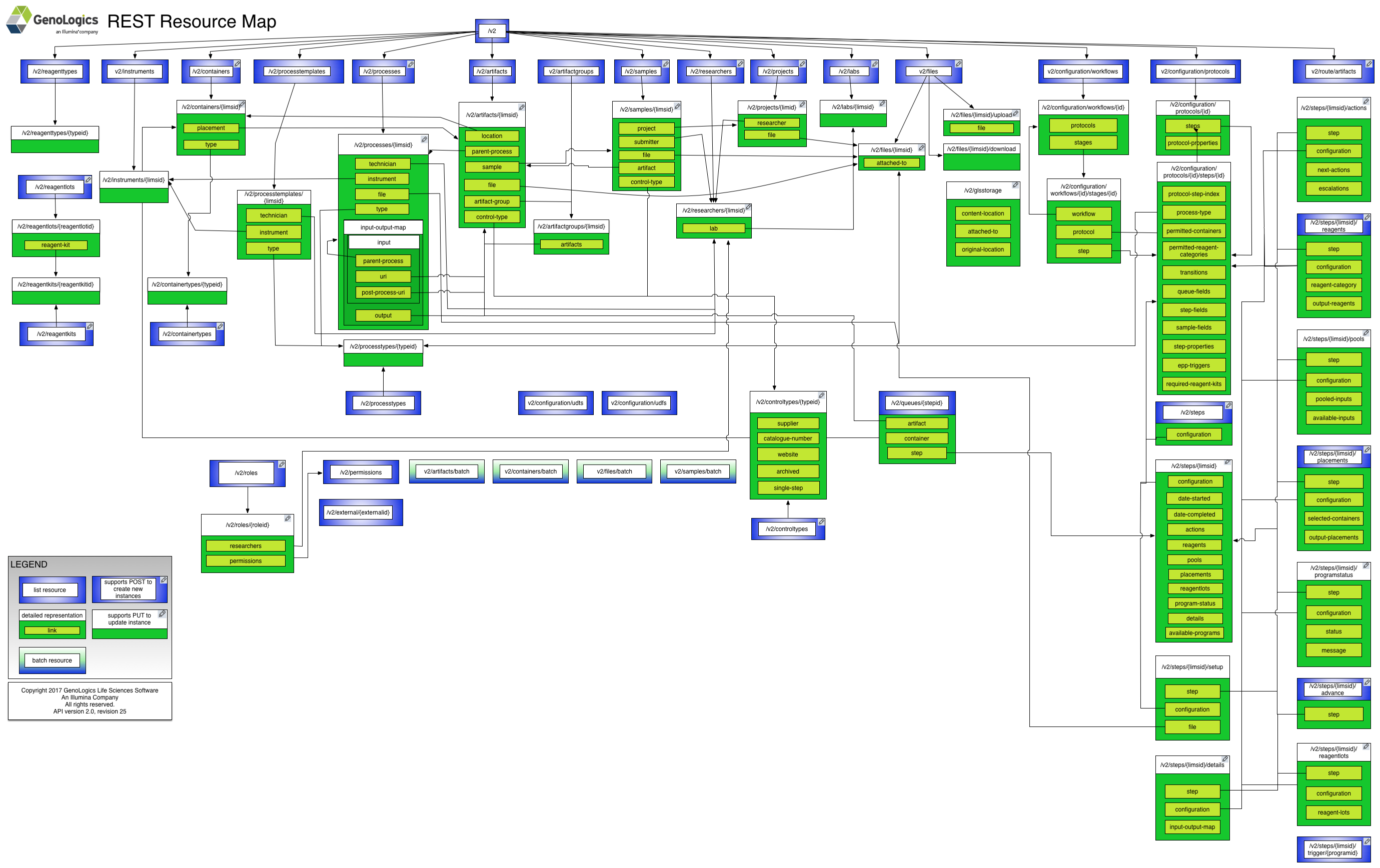
A good place to start is in the REST General Concepts section. To help navigate the resources, the following diagram highlights the methods available and the major resource relationships.
|
Supported Versions
API changes are tracked with the combination of a version number and a revision number.
The version number indicates forwards and backwards compatibility, while the revision number within the version describes features added to the API that will not negatively affect current functionality. Only the version number is referenced as part of the request; the revision number simply tracks incremental enhancements to the API.
The following version is described in this section of the web site:
| Version | Current Revision | Released with |
|---|---|---|
| v2 | r25 | Clarity LIMS 5.0 |
Previous versions can be accessed like so: http://genologics.com/developer/{ClarityVersion}
For example: http://genologics.com/developer/4.0
----Changes in Current Revision
- Setting a UDF value with an empty string will no longer include it in the response.
- The following fields have been added to Instruments:
- serial-number
- expiry-date
- archived
- The following fields have been added to ProcessTypes:
- queue-fields
- step-fields
- sample-fields
- ice-bucket-fields
- step-properties
- epp-triggers
- permitted-containers
- permitted-reagent-categories
- required-reagent-kits
- permitted-control-types
- permitted-instrument-types
- step-setup
- The order of Master Step (ProcessType) Groups of Defaults (process-templates) is reflected on the "Record Details" screen in the presets dropdown. One thing to note is that the behaviour has changed from some of the legacy API logic. Previously, the first Groups of Defaults for a Master Step would always be the default. This has now changed so that the default Groups Of Defaults does not affect their sequence any longer and once set the existing sequence of Groups of Defaults will be maintained.
- ProtocolSteps can now have a customizable name that can be different from the ProcessType name.
- ProtocolStep settings that are available and set on the step's Master Step (ProcessType) now show a locked attribute.
- The following fields have been added to ProtocolSteps:
- ice-bucket-fields
- permitted-instrument-types
- attemptAutoPlacement step property
- Deprecated the existing "defaultGrouping" ProtocolStep property which was meant only for the queue view. It has been replaced by step properties instead.
- We have moved step-setup file configuration from the Protocol resource to the ProcessType resource. You can no longer configure step-setup files using the Protocol resource. This was done so that multiple steps can share a common step-setup configuration on a ProcessType.
- Added milestone-specific ProtocolStep properties for the following, with the specific multiwellSortOrders to replace the deprecated multiwellSortOrderProperty:
- queueDefaultGrouping and queueMultiwellSortOrder
- poolingDefaultGrouping and poolingMultiwellSortOrder
- iceBucketDefaultGrouping and iceBucketMultiwellSortOrder
- placementDefaultGrouping, placementMultiwellSortOrder, placementDefaultPattern, placementSkipAlternatingRows, placementSkipAlternatingColumns
- recordDetailsMultiwellSortOrder
- ProtocolStep autoAttachFiles step property format has been updated to include isAutoAttached and locked attributes.
- ProtocolStep queue-fields will no longer maintain an absolute order mixed between detail and non-detail fields. Instead, the non-detail fields will be grouped first and ordered among themselves, then the detail fields will be grouped afterwards and be ordered among themselves. (same thing applies to the new ice-bucket-fields section)
- ProtocolStep ice-bucket-fields and queue-fields no longer require 'Sample Name' and 'Waiting' fields to be present, instead they just require that at least one custom field (whether built-in or user-defined) be present.
- ProtocolStep sample-fields will now add 'Sample Name' if omitted from requests.
- The 'QC' built-in field (for Analytes and Result Files) is not allowed to be added to queue-fields, ice-bucket-fields, or sample-fields. The API will return an error if this happens.
- Adding the REWORKED workflow stage action to show that a specific artifact has been reworked.
Requesting an API Version
The version number is a path parameter in each resource URI in the API. The desired API version is substituted into the following request URI:
/{version}/{resource}
The following example would request version 2 of the containers resource:
- /v2/containers
REST
This API supports a Representational State Transfer (REST) model for accessing a set of resources through a fixed set of operations. The following resources are accessible through the RESTful model:
- /{version}
- /{version}/{version}
- /{version}/artifactgroups
- /{version}/artifactgroups/{experimentid}
- /{version}/artifacts
- /{version}/artifacts/{limsid}
- /{version}/artifacts/batch/retrieve
- /{version}/artifacts/batch/update
- /{version}/configuration/protocols
- /{version}/configuration/protocols/{protocolid}
- /{version}/configuration/protocols/{protocolId}/steps/{stepId}
- /{version}/configuration/udfs
- /{version}/configuration/udfs/{udfid}
- /{version}/configuration/udts
- /{version}/configuration/udts/{udtid}
- /{version}/configuration/workflows
- /{version}/configuration/workflows/{workflowid}
- /{version}/configuration/workflows/{workflowid}/stages/{stageid}
- /{version}/containers
- /{version}/containers/{limsid}
- /{version}/containers/batch/create
- /{version}/containers/batch/retrieve
- /{version}/containers/batch/update
- /{version}/containertypes
- /{version}/containertypes/{containertypeid}
- /{version}/controltypes
- /{version}/controltypes/{controltypeid}
- /{version}/external/{externalid}
- /{version}/files
- /{version}/files/{limsid}
- /{version}/files/{limsid}/download
- /{version}/files/{limsid}/upload
- /{version}/files/batch/retrieve
- /{version}/files/batch/update
- /{version}/glsstorage
- /{version}/instruments
- /{version}/instruments/{instrumentid}
- /{version}/labs
- /{version}/labs/{labid}
- /{version}/permissions
- /{version}/permissions/{permissionId}
- /{version}/processes
- /{version}/processes/{limsid}
- /{version}/processtemplates
- /{version}/processtemplates/{limsid}
- /{version}/processtypes
- /{version}/processtypes/{processtypeid}
- /{version}/projects
- /{version}/projects/{limsid}
- /{version}/queues/{protocolStepId}
- /{version}/reagentkits
- /{version}/reagentkits/{reagentkitid}
- /{version}/reagentlots
- /{version}/reagentlots/{reagentlotid}
- /{version}/reagenttypes
- /{version}/reagenttypes/{reagenttypeid}
- /{version}/researchers
- /{version}/researchers/{researcherid}
- /{version}/roles
- /{version}/roles/{roleId}
- /{version}/route/artifacts
- /{version}/samples
- /{version}/samples/{limsid}
- /{version}/samples/batch/create
- /{version}/samples/batch/retrieve
- /{version}/samples/batch/update
- /{version}/steps
- /{version}/steps/{limsid}
- /{version}/steps/{limsid}/actions
- /{version}/steps/{limsid}/advance
- /{version}/steps/{limsid}/details
- /{version}/steps/{limsid}/placements
- /{version}/steps/{limsid}/pools
- /{version}/steps/{limsid}/programstatus
- /{version}/steps/{limsid}/reagentlots
- /{version}/steps/{limsid}/reagents
- /{version}/steps/{limsid}/setup
- /{version}/steps/{limsid}/trigger/{programid}
There is also a WADL document describing the REST API.
API Data Types
All endpoints act on a common set of data. The data can be represented in different data formats (i.e. MIME types), depending on the endpoint that consumes and/or produces the data. The data can described by XML Schema, which definitively describes the XML representation of the data, but is also useful for describing the other formats of the data, such as JSON.
This document will describe the data using terms based on XML Schema. Data can be grouped by namespace, with a schema document describing the elements and types of the namespace. Generally speaking, types define the structure of the data and elements are instances of a type. For example, elements are usually produced by (or consumed by) a REST endpoint, and the structure of each element is described by its type.
API Data Type Schemas
| id | namespace | schema file |
|---|---|---|
| ri | http://genologics.com/ri | ri.xsd |
| art | http://genologics.com/ri/artifact | artifact.xsd |
| artgr | http://genologics.com/ri/artifactgroup | artifactgroup.xsd |
| cnf | http://genologics.com/ri/configuration | configuration.xsd |
| con | http://genologics.com/ri/container | container.xsd |
| ctp | http://genologics.com/ri/containertype | containertype.xsd |
| ctrltp | http://genologics.com/ri/controltype | controltype.xsd |
| exc | http://genologics.com/ri/exception | exception.xsd |
| file | http://genologics.com/ri/file | file.xsd |
| inst | http://genologics.com/ri/instrument | instrument.xsd |
| itp | http://genologics.com/ri/instrumenttype | instrumenttype.xsd |
| lab | http://genologics.com/ri/lab | lab.xsd |
| perm | http://genologics.com/ri/permission | permission.xsd |
| prc | http://genologics.com/ri/process | process.xsd |
| prx | http://genologics.com/ri/processexecution | processexecution.xsd |
| ptm | http://genologics.com/ri/processtemplate | processtemplate.xsd |
| ptp | http://genologics.com/ri/processtype | processtype.xsd |
| prj | http://genologics.com/ri/project | project.xsd |
| prop | http://genologics.com/ri/property | property.xsd |
| protcnf | http://genologics.com/ri/protocolconfiguration | protcnf.xsd |
| que | http://genologics.com/ri/queue | queue.xsd |
| kit | http://genologics.com/ri/reagentkit | reagentkit.xsd |
| lot | http://genologics.com/ri/reagentlot | reagentlot.xsd |
| rtp | http://genologics.com/ri/reagenttype | reagenttype.xsd |
| res | http://genologics.com/ri/researcher | researcher.xsd |
| role | http://genologics.com/ri/role | role.xsd |
| rt | http://genologics.com/ri/routing | routing.xsd |
| smp | http://genologics.com/ri/sample | sample.xsd |
| stg | http://genologics.com/ri/stage | stage.xsd |
| stp | http://genologics.com/ri/step | step.xsd |
| protstepcnf | http://genologics.com/ri/stepconfiguration | protstepcnf.xsd |
| udf | http://genologics.com/ri/userdefined | userdefined.xsd |
| ver | http://genologics.com/ri/version | ver.xsd |
| wkfcnf | http://genologics.com/ri/workflowconfiguration | wkfcnf.xsd |
XML Data Elements
- namespace ri
- namespace art
- namespace artgr
- namespace cnf
- namespace con
- namespace ctp
- namespace ctrltp
- namespace exc
- namespace file
- namespace inst
- namespace itp
- namespace lab
- namespace perm
- namespace prc
- namespace prx
- namespace ptm
- namespace ptp
- namespace prj
- namespace prop
- namespace protcnf
- namespace que
- namespace kit
- namespace lot
- namespace rtp
- namespace res
- namespace role
- namespace rt
- namespace smp
- namespace stg
- namespace stp
- namespace protstepcnf
- namespace ver
- namespace wkfcnf
XML Data Types
- namespace ri
- namespace art
- namespace artgr
- namespace cnf
- namespace con
- namespace ctp
- namespace ctrltp
- namespace exc
- namespace file
- namespace inst
- namespace itp
- namespace lab
- namespace perm
- namespace prc
- namespace prx
- namespace ptm
-
namespace ptp
- container-type-link
- control-type-link
- epp-trigger
- field
- file
- icebucketfield
- invocation-type
- output-generation-type
- parameter
- process-input
- process-output
- process-type
- process-type-attribute
- process-type-link
- process-types
- queuefield
- reagent-kit-link
- step-property
- step-setup
- style
- trigger-point
- trigger-status
- trigger-type
- type-definition
- variability-type
- namespace prj
- namespace prop
- namespace protcnf
- namespace que
- namespace kit
- namespace lot
- namespace rtp
- namespace res
- namespace role
- namespace rt
- namespace smp
- namespace stg
-
namespace stp
- actions
- actions-link
- action-type
- artifact
- automatic-next-step-link
- available-program
- container
- creation-input
- details
- details-link
- escalated-artifact
- escalation
- escalation-request
- escalation-review
- file
- input
- input-output-map
- instrument
- next-action
- output
- output-generation-type
- output-placement
- placements
- placements-link
- pooled-inputs
- pools
- pools-link
- program-status
- program-status-link
- reagent-label
- reagent-lot-link
- reagent-lots-link
- reagents
- reagents-link
- reagents-lots
- setup
- setup-link
- status
- step
- step-configuration
- step-creation
- user
- namespace protstepcnf
- namespace udf
- namespace ver
- namespace wkfcnf